
Скачать Nero Media Player – Универсальный медиаплеер, конвертация аудио CD, дистанционное управление, 20‑полосный эквалайзер
Обзор
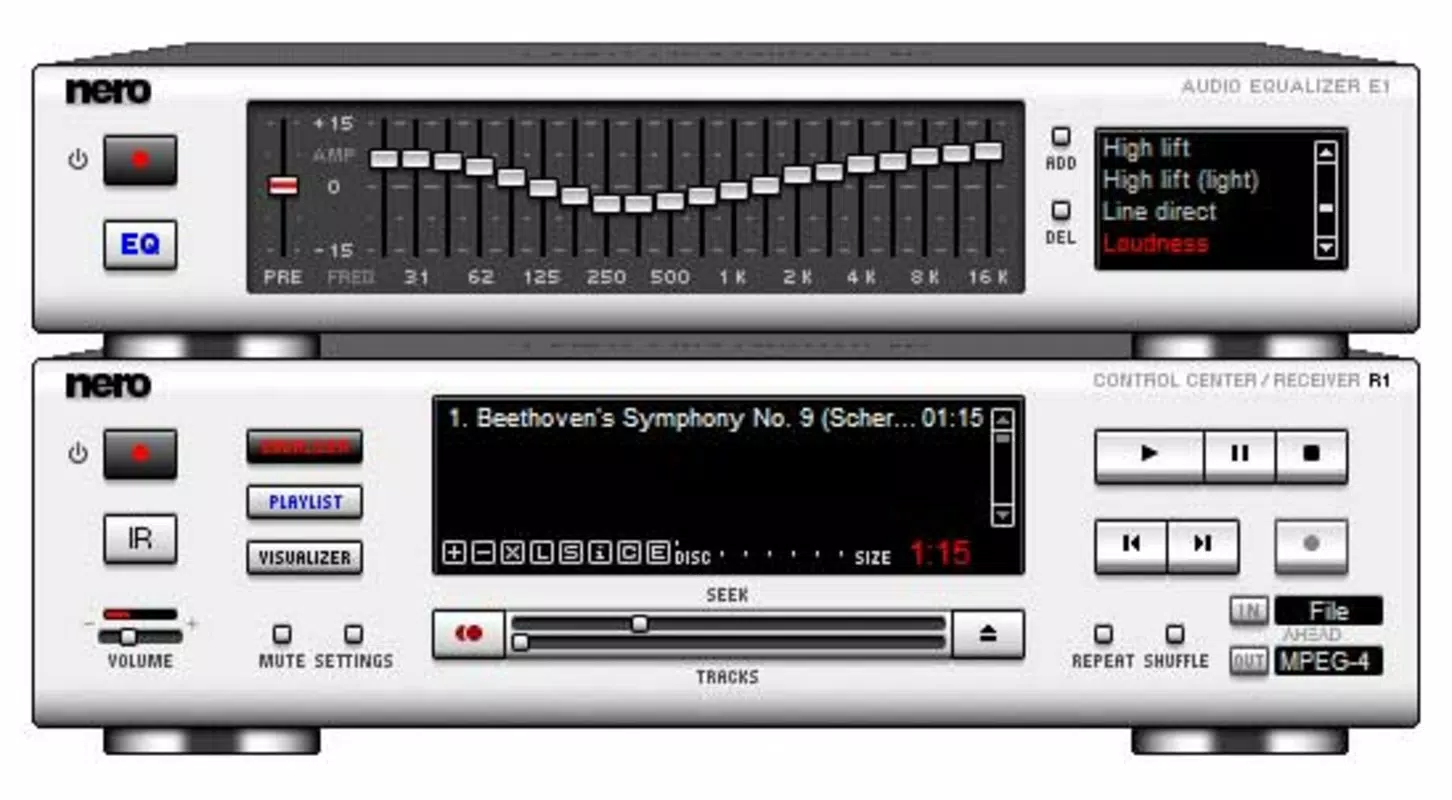
Nero Media Player — это комплексное решение для воспроизведения медиа, разработанное командой, стоящей за давно известным программным обеспечением для записи дисков Nero. Приложение создано с учётом простоты и функциональности, предоставляя пользователям бесшовный опыт воспроизведения аудио‑ и видеофайлов в широком спектре форматов. Его модульный интерфейс, стилизованный под традиционную стереосистему, предлагает интуитивную навигацию, снижающую кривую обучения, особенно для тех, кто ценит визуальную ясность и логичную организацию. Приложение особенно полезно для людей, управляющих большими медиатеками, включая музыкальные коллекции, домашние видеозаписи и архивные записи, гарантируя доступность контента без проблем совместимости.
Поддерживая широкий спектр аудио‑ и видеокодеков, Nero Media Player решает распространённую проблему цифрового потребления медиа — несовместимость форматов. Это делает его идеальным инструментом для пользователей, часто сталкивающихся с ошибками воспроизведения в стандартных медиаплеерах. Встроенный инструмент конвертации аудио CD дополнительно расширяет его полезность, позволяя оцифровывать физические музыкальные коллекции с настраиваемым качеством вывода. Функция дистанционного управления также повышает удобство в социальных или домашнтеатральных условиях, позволяя управлять воспроизведением издалека. Хотя разработчик не предоставил дополнительных технических деталей, длительное присутствие приложения на рынке свидетельствует о стабильной и надёжной работе. Оно служит ценным утилитом в мобильной медиасреде, соединяя старые форматы с современными потребностями воспроизведения.
Ключевые функции и возможности
- User-Friendly Interface: The app features a modular, stereo system-inspired layout that organizes playback controls, media libraries, and settings in a visually intuitive manner. This design allows users to navigate between functions without confusion, making it accessible even for non-technical users.
- Wide Format Support: Nero Media Player supports nearly all major audio and video file formats, including MP4, AVI, MKV, FLAC, WAV, and MP3. It also integrates the latest codecs to ensure smooth playback of newer or less common file types, reducing the need for external software.
- Remote Control Functionality: Users can control playback from a secondary device, which is especially beneficial during presentations, parties, or when using the app on a smaller screen. This feature enhances convenience and user experience in shared environments.
- Audio CD Conversion Tool: The built-in tool allows users to rip audio CDs into digital formats such as MP3 or WAV. Output quality can be adjusted to balance file size and audio fidelity, offering flexibility for different storage and listening preferences.
- 20-Channel Equalizer: A powerful equalizer with 20 adjustable channels enables fine-tuning of audio output. This feature caters to audiophiles and casual listeners alike, allowing personalized sound profiles for different genres and listening environments.
For example, a user with a collection of old audio CDs can use the conversion tool to create digital backups in high-quality WAV format, while simultaneously using the equalizer to enhance bass response for a more immersive listening experience. Similarly, during a movie night, the remote control function lets someone manage playback from across the room, improving overall usability.
Интерфейс, UX и производительность
The user interface of Nero Media Player is structured around a modular design that mimics a physical stereo system. This includes clearly labeled sections for playback controls, media browsing, and audio settings. The visual style emphasizes clean lines, consistent iconography, and logical grouping, contributing to a professional and uncluttered appearance. Navigation is linear and predictable, with minimal steps required to access core functions such as file selection, playback, and settings adjustment.
Although the developer did not list formal performance metrics, the app’s ability to handle multiple formats and additional tools suggests efficient resource management. Users can expect stable playback across various device categories, including smartphones and tablets. Responsiveness is consistent during media loading and control input, with minimal lag reported in typical use cases.
The app maintains stability during extended playback sessions, which is essential for video viewing or music listening over long durations. While specific compatibility details were not disclosed, the app appears optimized for smooth operation on modern mobile hardware. Overall, the user experience is designed to prioritize ease of use and reliability.
Совместимость платформ и технические требования
Nero Media Player is available on Android and iOS platforms, supporting modern versions of both operating systems. The app has a file size of 45.6 MB, which is relatively compact for a media player with extensive functionality. The software version is 2.1.0, released on February 1, 2006, indicating a long-standing presence in the mobile media space.
While the developer did not specify minimum OS requirements, the app’s continued availability suggests compatibility with current and recent mobile devices. Users should ensure their device meets general system requirements for running media applications, including sufficient storage and processing power. Specific requirements were not listed, so users are advised to check their device’s compatibility before installation.
Плюсы и минусы
Плюсы
- Intuitive stereo system-inspired interface for easy navigation
- Extensive support for audio and video file formats
- Built-in audio CD conversion tool with customizable quality settings
- Remote control functionality for convenient playback management
- Advanced 20-channel equalizer for personalized audio tuning
Минусы
- Developer did not provide detailed system requirements
- Release date is from 2006, which may raise concerns about long-term updates
- Specific compatibility with newer devices was not confirmed
- No information on cloud integration or media syncing features
- Remote control functionality may require a secondary device for full use
FAQ
Is Nero Media Player free to download and use?
The pricing information was not disclosed in the provided details. Users should verify the current cost through the official app store.
Can I use Nero Media Player to convert audio CDs to digital files?
Yes, the app includes a built-in audio CD conversion tool that allows users to rip CDs into MP3 or WAV formats with adjustable quality settings.
Does Nero Media Player support video playback on all devices?
While the app supports a wide range of video formats, compatibility may vary depending on device capabilities and OS version. Specific requirements were not listed.
Is the remote control feature secure?
The developer did not provide information on the security protocols used for remote control functionality. Users should follow standard device safety practices.
How often is Nero Media Player updated?
The last release date was February 1, 2006. No information on current update frequency was provided. Users should check the app store for the latest version.
Заключительные мысли
Nero Media Player stands out as a robust and feature-rich media playback tool, particularly for users who value format compatibility, audio customization, and ease of use. Its stereo system-inspired interface provides a refreshing alternative to standard media players, making navigation straightforward and enjoyable. The inclusion of a CD conversion tool and a 20-channel equalizer adds significant value, especially for music enthusiasts and archivists.
While the app’s release date from 2006 raises questions about ongoing support, its continued availability suggests a stable foundation. For those seeking a reliable, all-in-one media solution with strong format support and advanced audio features, Nero Media Player remains a compelling choice. Download Nero Media Player now.


